

Chargebacks
A dispute occurs when a customer disagrees with or doesn't recognize a transaction and requests that the payment be reversed. For credit and debit card payments, this process is known as a chargeback.
Depending on the payment method, the card scheme or Klarna notifies MultiSafepay of the dispute and the disputed transaction amount may be reclaimed from you.
User guide
When a customer requests a chargeback, an alert appears on your dashboard homepage.
To see your chargebacks:
- Go to your MultiSafepay dashboard .
- Go to Transactions and click Disputes.
- Here, you can find all new, pending, or disputed cases. To learn more about the different statuses, see:
Each dispute page contains the following information:
- Transaction details: Information about the original transaction, including the transaction ID, payment method, status, amount, order ID, and 3D Secure authentication status.
- Dispute details: Information about the dispute, including its status, reason, reason code, dispute ID, creation date, amount, fee, and Acquirer Reference Number (ARN).
- Related transactions: Transactions associated with the dispute, such as the original chargeback, chargeback reversals, and arbitration chargebacks.
How to accept a chargeback
You can accept a chargeback from your MultiSafepay dashboard. Once accepted, the dispute is closed in favor of the cardholder and can no longer be defended. The disputed amount and applicable chargeback fee are charged to you.
To accept a chargeback:
- Go to your MultiSafepay dashboard .
- Click Transactions and go to Disputes. Select the relevant dispute.
- In the Dispute page, above Dispute Details, click Accept Chargeback.
- Review the confirmation message carefully. It includes important information about the financial impact of the chargeback and the consequences of accepting it. The message includes the following details:
- Dispute amount: The transaction amount disputed by the customer.
- Chargeback fee: The fee charged for processing the chargeback.
- Total impact: The total amount charged to you, consisting of the dispute amount and the chargeback fee.
- Click Confirm to accept the chargeback.
- After you accept the chargeback:
- The dispute is closed in favor of the cardholder.
- You can no longer defend the chargeback.
- The dispute amount and chargeback fee are charged to you.
How to defend a chargeback
MultiSafepay can dispute chargebacks on your behalf. If you choose to defend a chargeback, you must submit the required supporting evidence within the specified timeframe. If you don't want to defend the chargeback, you can accept it or take no action. If the response period expires, the chargeback is automatically accepted and can no longer be defended.
To defend a chargeback:
- Go to your MultiSafepay dashboard .
- Click Transactions and go to Disputes. Select the relevant dispute.
- In the Dispute page, above Dispute Details, click Defend Chargeback.
- Click Confirm to proceed.
- A new section will render in the dispute page called Chargeback dispute. Here, you can:
- Find the Reason code and Reason description related to the dispute
- Add relevant documentation as evidence
- Include an explanation to further strengthen your case
Documentation
Consumer protection is the main purpose of chargebacks and card scheme rules. Upload relevant documentary evidence, and make sure it's valid, up-to-date, and clearly presented:
| Document type | Required information |
|---|---|
| Invoice/Receipt | Invoice or receipt for the order, including details of the product, customer, and delivery location. |
| Shipping documentation | Tracking information (Track & Trace), shipping label, delivery confirmation, and signed proof of delivery. |
| Other documents | Evidence of communication with the cardholder, such as emails or conversations, and applicable refund, cancellation, or return policies. |
You can upload your documents:
Via your dashboard
- Go to your MultiSafepay dashboard .
- Click Transactions and go to Disputes. Select the relevant dispute.
- Under Chargeback dispute, go to Add evidence.
- Under the relevant section, click Browse Files and select the files directly from your computer.
- The files will be added under each section (Invoice/Receipt, Shipping Documentation, and Other Documents).
Explanation
Include an explanation, in English, stating your case and including additional details if necessary. Including this information can decide whether a case is won or lost in your favor.
Once you have uploaded the required documentation and added your explanation, click Submit dispute. We will contact you by email if any documentation is missing or invalid.
If the documentation has been validated, the chargeback status will change to Processed.
The Chargeback Team then assesses the evidence provided and decides whether the chargeback can be disputed.
- For questions about disputes, email [email protected]
- For more information about fees, email [email protected]
Note:All chargebacks require a response before the due date specified on the Dispute page. If no action is taken by then, the chargeback will be automatically accepted, and the consumer will be refunded.
Credit and debit card chargebacks
The chargeback process, deadlines, and evidence requirements vary depending on the card scheme.
Chargeback lifecycle
The following sections explain how disputes progress from the initial chargeback through review and final resolution.
Visa and Mastercard
To dispute a chargeback on a credit or debit card for Visa or Mastercard, see the process flow below. Click to magnify.
Initial stage
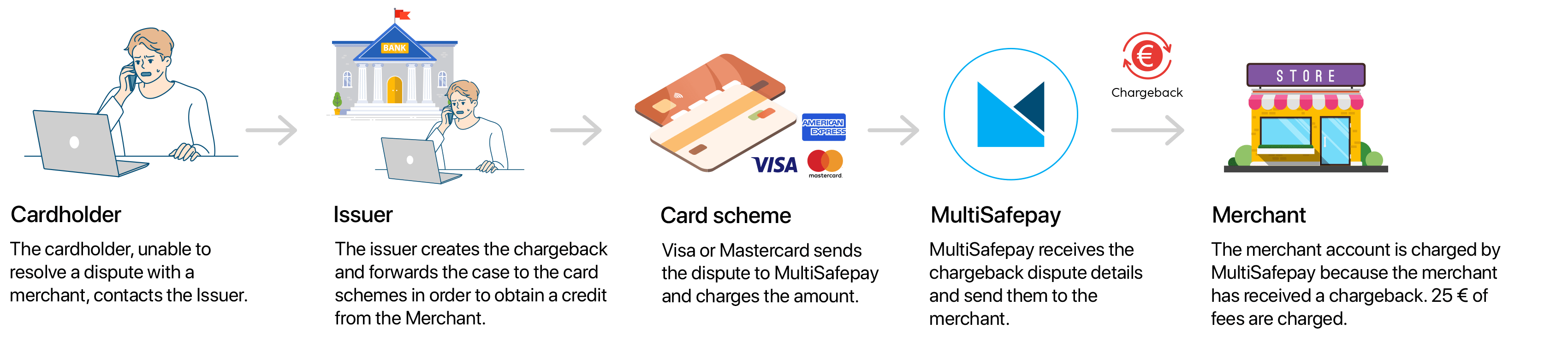
Dispute stage
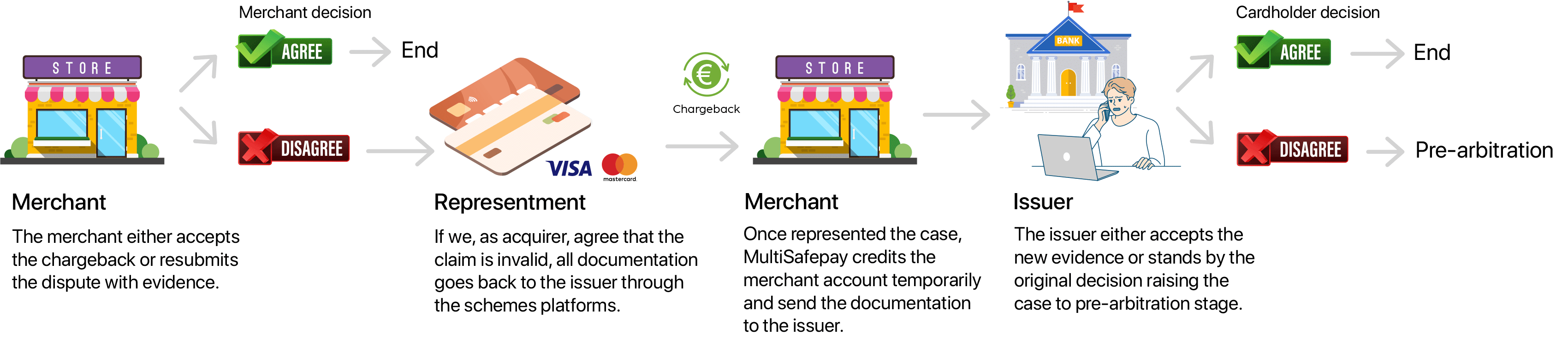
Final stage
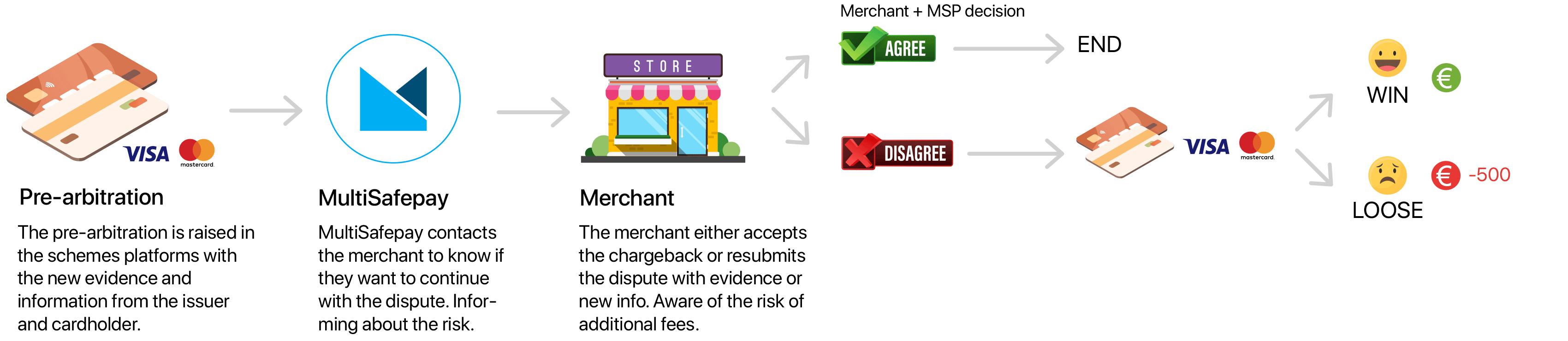
American Express
When an American Express cardholder disputes a transaction, the chargeback process is initiated and handled directly by American Express, without an issuing bank acting as an intermediary in the initial and subsequent phases. The steps are generally similar to those of Visa and Mastercard, with MultiSafepay still involved as the payment processor.
Chargeback statuses
Check the table below to know the meaning of each status:
| Status | Description |
|---|---|
| New | You have received a new chargeback. You can either accept or dispute it. |
| Opened | You have opened the chargeback but haven't accepted or disputed it. |
| Accepted | You have accepted the chargeback. The consumer receives a refund. |
| Submitted | You have disputed a chargeback and submitted the required supporting documentation. We will review it. ⚠️Note: Remember to upload the evidence before the due date. |
| Ready | We have requested additional information, which can be submitted through your dashboard. The due date will also be modified. |
| Processed | Your documentation has been validated and forwarded to the scheme. |
Reasons and required evidence
When a cardholder requests a chargeback, they must provide a reason.
The most common reasons for chargebacks include:
- Processing or authorization errors.
- Customer disputes, for example:
- The order didn't arrive.
- The items were defective, damaged, or not as described.
- The service was not delivered as expected.
- The customer didn't receive the expected credit.
- Fraud, including "friendly fraud," for example, when the cardholder:
- Doesn't recognize your company name or a specific transaction.
- Requests a chargeback instead of following your refund or returns process.
- Regrets the purchase.
- Forgets to cancel a subscription.
If you ask MultiSafepay to defend a chargeback on your behalf, we specify the supporting evidence required for the applicable chargeback reason. Provide as much relevant supporting documentation as possible.
Reason codes
Each card scheme uses its own reason codes to identify why a cardholder has requested a chargeback. Select the applicable card scheme below to view the reason codes and required evidence.
Visa
Fraud
Reason code 10.4: Card absent environment
The cardholder denies participating in the transaction you processed.
To dispute this type of chargeback, you need to provide the following:
- Evidence the cardholder is in possession of and/or using the product/service, e.g. proof of delivery.
- Evidence that the transaction was completed by a member of the cardholder's household or family.
- Evidence of previous interactions with the cardholder, e.g., other purchases, payment details.
- A transaction receipt.
- An invoice number.
- A track and trace number.
- Photos or emails proving a link between the person who received the product/service and the cardholder.
Processing error
Reason code 12.2: Incorrect transaction code
The wrong transaction code was used. For example, you meant to send a credit to a customer, but accidentally debited their account instead.
To dispute this type of chargeback, you need to provide the following:
- Invoice with the product description
- Any relevant explanation of transaction type and why it was processed that way.
- Proof the correct transaction was completed (e.g., reversal, corrected transaction).
- If applicable, a screenshot of POS system or logs showing the method selected.
- Communication with the cardholder
Reason code 12.5: Incorrect amount
The transaction amount is incorrect, or an error occurred.
To dispute this type of chargeback, you need to provide the following:
- A transaction receipt.
- An invoice number.
- Evidence that the transaction amount is correct.
Reason code 12.6: Duplicate processing or paid by other means
The cardholder or authorized person did not receive the product/service because you were unwilling or unable to provide it.
To dispute this type of chargeback, you need to provide proof that:
- Both transactions are independent and separate.
- The transaction was not paid by other means or separate means.
Customer dispute
Reason code 13.1: Merchandise or services not received
The cardholder or authorized person did not receive the product/service because you were unwilling or unable to provide it.
To dispute this type of chargeback, you need to provide the following:
- A description of the product/service.
- Evidence that the cardholder is in possession of and/or using the product/service, e.g. proof of delivery.
- Proof of delivery, e.g., cardholder signature.
- An invoice number.
- A track and trace number.
- Evidence of communications with the cardholder.
Reason code 13.2: Cancelled recurring transaction
The cardholder:
- Withdrew permission to charge their bank account for a recurring transaction or installment transaction, or
- Notified you before the transaction was processed that their account was closed.
To dispute this type of chargeback, you need to provide evidence that:
- You have previously completed successful transactions from that bank account.
- The product/service was used after the cancellation, e.g., ID and/or login history.
- The transaction was properly authorized and settled as a recurring transaction.
- The transaction was a recurring transaction, including proof that the cardholder had to click to accept the terms and conditions of recurring transactions or that they signed a contract agreeing to the terms and conditions
Reason code 13.3: Not as described
The product/service:
- Did not match your description on the transaction receipt or elsewhere when purchased, or
- Was damaged or defective.
To dispute this type of chargeback, you need to provide the following:
- Proof of delivery of the product/service.
- Your original description of the product/service.
- An invoice number.
- A track and trace number.
- Evidence of communications with the cardholder.
- Evidence that the cardholder did not attempt to return the product/service.
Reason code 13.4: Counterfeit merchandise
The merchandise was identified as counterfeit by one or more of the following:
- The owner of the intellectual property or its authorized representative.
- A customs agency, law enforcement agency, or other government agency.
- A third-party expert.
To dispute this type of chargeback, you need to provide the following:
- Proof of authenticity for example: Invoice, and Invoice from authorized suppliers
- Proof of refund
- Communication with the cardholder
- Terms and Conditions, by Click to Accept.
- Proof of delivery of the product/service.
- Shipping and tracking details, and proof of delivery.
Reason code 13.5: Misrepresentation
The cardholder claims a purchased item or service was misrepresented and alleges false advertising.
Reason code 13.6: Credit not processed
The cardholder did not receive the funds for credit or voided transaction receipt.
To dispute this type of chargeback, you need to provide the following:
- Details about the transaction.
- An invoice number.
- Evidence of communications with the cardholder.
Reason code 13.7: Cancelled service and/or merchandise
The cardholder cancelled or returned the product/service. Or, you did not properly disclose or did disclose but did not apply a limited return or cancellation policy at the time of the transaction.
To dispute this type of chargeback, you need to provide the following:
- Evidence of the cardholder using the service.
- Evidence of delivery of products/services that the cardholder did not return.
- Evidence that the cardholder had to click to accept your cancellation policy and that your policy does not include the right to dispute terms and conditions available on your website.
- An invoice number.
- A track and trace number.
- Evidence of communications with the cardholder
Mastercard
Authorization
Reason code 4808: Authorization-related chargeback
The transaction was processed without valid authorization.
To dispute this type of chargeback, you need to provide the following:
- Proof of the service was used
- Proof of delivery merchandise
- Tracking and invoice
- Proof of contact with the cardholder
Fraud
Reason code 4837: Fraud related chargeback or no cardholder authorization
The cardholder denies participating in the transaction you processed.
To dispute this type of chargeback, you need to provide the following:
- Evidence that:
- The cardholder is in possession of and/or using the product/service, e.g. proof of delivery.
- The transaction was completed by a member of the cardholder's household or family.
- Evidence of previous interactions with the cardholder, e.g., other purchases, payment details.
- A transaction receipt.
- An invoice number.
- A track and trace number.
- Photos or emails proving a link between the person who received the product/service and the cardholder
Reason code 4863: Potential fraud, the cardholder does not recognize the transaction
The cardholder denies participating in or does not recognize the transaction you processed.
To dispute this type of chargeback, you need to provide the following:
- Evidence that:
- The cardholder is in possession of and/or using the product/service, e.g. proof of delivery.
- The transaction was completed by a member of the cardholder's household or family.
- The cardholder is using the product/service.
- A copy of the cardholder's identification.
- Evidence of previous interactions with the cardholder, e.g., other purchases, payment details
- A transaction receipt.
- An invoice number.
- A track and trace number.
- Photos or emails proving a link between the person who received the product/service and the cardholder.
Processing error
Reason code 4831: Dispute amount or an incorrect amount
The cardholder claims that you processed an incorrect amount.
To dispute this type of chargeback, you need to provide the following:
- A transaction receipt.
- An invoice number.
- Evidence that:
- The transaction amount was correct.
- you have the right to alter the transaction amount without the cardholder's consent after the transaction is completed.
Reason code 4834: Duplicate processing
The issuer determines that you submitted duplicate transactions.
To dispute this type of chargeback, you need to provide proof that both transactions:
- Are separate
- Are valid
- Were authorized by the cardholder's personal identification number (PIN)
Customer dispute
Reason code 4841: Digital goods, cancelled recurring transaction
The cardholder:
- Withdrew permission to charge their bank account for a recurring transaction or installment transaction, or
- Notified you before the transaction was processed that their account was closed.
To dispute this type of chargeback, you need to provide evidence that:
- You have previously completed successful transactions from that bank account.
- The cardholder used the product/service after the cancellation, e.g., ID and/or login history.
- The transaction was properly authorized and settled as a recurring transaction.
- The transaction was a recurring transaction, including proof that the cardholder had to click to accept the terms and conditions of recurring transactions or that they signed a contract agreeing to the terms and conditions.
Reason code 4853: Cardholder dispute: Goods or service not delivered, Goods not as described
The product/service did not match your description on the transaction receipt or other record at the time of purchase, or
- The transaction was not completed, or
- The product/service the cardholder received was damaged or defective, or
- The cardholder disputes the quality of the product/service received.
To dispute this type of chargeback, you need to provide the following:
- Proof of delivery of the product/service.
- A description of the product/service.
- An invoice
- A track and trace number.
- Evidence of communications with the cardholder.
- Evidence that the cardholder did not attempt to return the product/service.
If the transaction involved physical goods, also provide evidence that you disclosed the following information to the cardholder before requesting their payment card details:
- The country from which the goods were shipped, if different from the delivery country. This requirement does not apply when the goods are shipped between countries within the European Economic Area (EEA) and there are no additional delivery costs beyond the transaction amount.
- Whether you or the cardholder are responsible for additional delivery-related costs, such as duties, tariffs, customs fees, or additional taxes.
- The return location where the goods must be sent, if your return policy allows returns.
American Express
Fraud
Reason code 4526: Missing signature
The cardholder claims the transaction is fraudulent, and their signature is not on the relevant documents.
To dispute this type of chargeback, you need to provide proof that:
- The receipt is signed, or
- The cardholder was present at the time of the transaction, or
- The transaction was verified by 3D Secure.
Reason code 4540: Card not present
The cardholder denies participating in a MOTO transaction you processed. American Express investigates and confirms that the transaction is fraudulent.
To dispute this type of chargeback, you need to provide evidence that:
- The cardholder did participate in the transaction.
- The product/service was delivered to the cardholder's billing address, and the cardholder signed a receipt.
Reason code 4573: Fraud, full recourse
The cardholder denies authorizing the charge, and your business has been placed in the fraud full recourse program: Investigation confirms fraud.
To dispute this type of chargeback, you need to provide proof that the transaction is exempt or was authorized by a PIN or 3D Secure.
Reason code 6006: Fraud, unrecognized transaction
The cardholder informs American Express that they believe the transaction is fraudulent.
To dispute this type of chargeback, you need to provide the following:
- Proof that the cardholder agreed to the transaction, made the booking/reservation, and received confirmation.
- Your website name, URL, IP address, and cancellation policy.
- Signed proof that the product/service was shipped and delivered, and the delivery address and date.
Processing error
Reason code 4512: Multiple processing
You sent multiple transactions for the same amount.
To dispute this type of chargeback, you need to provide the following:
- Proof that you have already processed a corrective card transaction.
- A fully itemized document that links the cardholder to each charge processed and proves that all transactions are valid.
Reason code 4513: Credit not presented
The cardholder received written acknowledgment from you for a credit, or they cancelled in accordance with your policy but have not yet received the refund.
To dispute this type of chargeback, you need to provide the following:
- Proof that you have already processed a corrective card transaction
- A fully itemized document that links the cardholder to each charge processed and proves that all transactions are valid
- Screenshots of your cancellation policy
- Evidence that:
- The cardholder clicks to accept the terms and conditions.
- your cancellation policy does not include the right to dispute the policy.
Reason code 4515: Paid through other means
The cardholder informed American Express that the transaction was:
- Altered after they signed for it, or
- Submitted using an incorrect card number or amount.
To dispute this chargeback, you need to prove that the cardholder's payment was unrelated to the disputed transaction.
Reason code 4516: Request for support not fulfilled and/or no reply to inquiry letter
American Express asked you to provide documents to support a charge queried by a cardholder, but you have yet to respond.
To dispute this chargeback, you must provide proof that you have already processed a corrective card transaction.
Reason code 4517: Insufficient or unclear reply to dispute inquiry letter
Fully itemized documents are not clear or complete and do not adequately link the cardholder to the transaction.
To dispute this type of chargeback, you need to provide the following:
- The date and amount of credit and the reason.
- An itemized invoice and/or receipt that directly links the cardholder to the charge.
- A successfully completed fax transmission report.
- Proof that the documents were sent and received by American Express within the time limit on the dispute inquiry letter.
Reason code 4534: Multiple ROCs
The cardholder denies participating in the transaction despite your previous successful transactions.
To dispute this chargeback, you must provide fully itemized documents linking the cardholder to each charge processed and proving that all transactions are valid.
Customer dispute
Reason code 4544: Goods and services, cancellation of recurring payments
You have continued to charge the cardholder's account after they requested cancellation of Recurring payments.
To dispute this type of chargeback, you need to provide the following:
- A signed letter refuting the cardholder's claim and/or proof that their evidence is incorrect.
- A copy of your cancellation policy and a statement indicating why the cancellation does not comply with your policy.
Reason code 4553: Goods and services, not as described
The cardholder received a product/service that differs from the written description you provided or is damaged.
To dispute this type of chargeback, you need to provide the following:
- Proof that the product/service is as originally described.
- A copy of your returns and refunds policies.
- If available, authentication or a written assessment of the product/service.
Reason code 4554: Goods and services, not received
The cardholder did not receive the product/service or only in part.
To dispute this type of chargeback, you need to provide evidence that:
- The cardholder or authorized person did receive the product/service, e.g., proof of delivery.
- The product/service was delivered to the cardholder's billing address.
- The cardholder neither cancelled nor returned the product/service.
Reason code 4798: American Express fraud dispute
The cardholder denies authorizing the charge, and your business has been placed in the fraud full recourse program: Investigation confirms fraud
To dispute this type of chargeback, you need to provide proof that the transaction is exempt or was authorized by a PIN or 3D Secure.
Klarna disputes
When a customer raises an issue with a Klarna order, the order enters Klarna's dispute process. This page explains the dispute lifecycle, the actions and deadlines for each stage, and when a dispute fee applies for merchants using Klarna via MultiSafepay.
Each dispute is assigned a unique dispute ID. This ID remains the same throughout the dispute lifecycle, even if the dispute progresses to another stage, such as a chargeback or cancellation. Use this ID to track the dispute from creation through final resolution.
To accept or defend a Klarna dispute, check the following information:
For more information about Klarna disputes, check the sections below.
Dispute lifecycle
A Klarna dispute consists of two main phases:
- Resolution period: You can resolve the issue directly with the customer before Klarna intervenes.
- Escalation: If the issue isn't resolved within the resolution period, Klarna escalates the dispute and requests evidence or additional information.
Resolution period
When a customer raises an issue, Klarna pauses the invoice and encourages the customer to contact you directly.
You have:
- Up to 21 days to resolve most disputes.
- 3 days for unauthorized purchases.
Try to resolve the issue directly with the customer during this period. If you reach a resolution, the dispute is closed without further action.
If the issue isn't resolved before the resolution period expires, Klarna escalates the dispute and requests evidence or additional information from you.
The following flow shows what happens during the resolution period:
Resolution period
---
config:
  theme: default
  themeVariables:
    mainBkg: "#3fa9f5"
    actorTextColor: white
    actorBorder: "#d2dae3"
    noteBkgColor: "#faebbf"
    noteBorderColor: "#faebbf"
    labelBoxBkgColor: "#f2f7fc"
    labelBoxBorderColor: "#d2dae3"
  sequence:
    messageFontFamily: "mulish extralight"
    messageFontWeight: normal
    messageFontSize: 12
    actorFontWeight: normal
    actorFontFamily: "mulish"
    actorFontSize: 16
    noteFontFamily: "mulish"
    noteFontSize: 12
---
sequenceDiagram
    autonumber

    participant C as Customer
    participant K as Klarna
    participant M as MultiSafepay
    participant Mer as Merchant

    C->>K: Raises an issue
    K->>C: Pauses invoice
    K->>M: Dispute enters resolution period
    M->>Mer: Notifies merchant

    Mer->>C: Attempts to resolve the issue

    Note over K,Mer: Up to 21 days (3 days for unauthorized purchases)

    alt Issue resolved
        K->>M: Dispute closed
        M->>Mer: Notifies merchant
        Note over K,Mer: No dispute fee

    else Resolution period expires
        K->>M: Escalates dispute
        M->>Mer: Notifies merchant
    end
Dispute escalation
After escalation, provide the requested evidence or additional information by the deadline specified for the dispute.
If you don't respond by the deadline, Klarna reviews the dispute without your input.
The outcome of an escalated dispute determines whether a dispute fee applies.
The following flow shows what happens after a dispute is escalated:
Escalation
---
config:
  theme: default
  themeVariables:
    mainBkg: "#3fa9f5"
    actorTextColor: white
    actorBorder: "#d2dae3"
    noteBkgColor: "#faebbf"
    noteBorderColor: "#faebbf"
    labelBoxBkgColor: "#f2f7fc"
    labelBoxBorderColor: "#d2dae3"
  sequence:
    messageFontFamily: "mulish extralight"
    messageFontWeight: normal
    messageFontSize: 12
    actorFontWeight: normal
    actorFontFamily: "mulish"
    actorFontSize: 16
    noteFontFamily: "mulish"
    noteFontSize: 12
---
sequenceDiagram
    autonumber

    participant K as Klarna
    participant M as MultiSafepay
    participant Mer as Merchant

    K->>M: Requests evidence or additional information
    M->>Mer: Requests evidence or additional information

    alt Merchant provides evidence
        Mer->>M: Submits evidence
        M->>K: Submits response
        K->>K: Reviews dispute
        K->>M: Provides outcome
        M->>Mer: Notifies merchant

    else Merchant refunds customer
        Mer->>M: Processes refund
        M->>K: Submits refund
        K->>M: Closes dispute
        M->>Mer: Notifies merchant
        Note over K,Mer: Dispute fee applies

    else No response
        Mer--xM: No response
        M->>K: No response received
        K->>K: Reviews dispute without merchant input
        K->>M: Provides outcome
        M->>Mer: Notifies merchant
        Note over K,Mer: Dispute fee applies
    end
Dispute fees
All dispute fees are charged as a passthrough from Klarna. Fees are set and levied by Klarna. MultiSafepay does not add any additional charge.
Under the current dispute process, a fee is charged only for specific outcomes, not for every dispute.
Check the table below to learn more about different dispute scenarios.
| Scenario | Outcome | Fee |
|---|---|---|
| Refunded during the resolution period | Closed during resolution period | No fee |
| Dispute cancelled by customer after escalation | Closed by customer | No fee |
| Refunded after escalation | Closed after refund | Fee |
| No response after escalation | Closed without merchant response | Fee |
Excessive dispute fees
An additional excessive dispute fee applies only when your dispute rate exceeds 1.5%. If your dispute rate remains below 1.5%, no excessive dispute fee is charged. For more information, see Klarna – Excessive Dispute Fee Criteria .
This fee originates from Klarna. MultiSafepay does not add any additional charges. For the current fee amounts, see Klarna – Dispute fees .
Dispute statuses
Check the table below to know the meaning of each status:
| Status | Description |
|---|---|
| Created | You have received a new dispute. You can either accept or dispute it. |
| Accepted by merchant | You have accepted the chargeback. The consumer receives a refund. |
| Submitted | You have disputed a chargeback and submitted the required supporting documentation. We will review it. ⚠️Note: Remember to upload the evidence before the due date. |
| Responded | You have received a response based on submitted documentation, which can be accepted, rejected, or given an alternative. |
| Mediation | A mediator has been assigned to your case. |
| Resolved | An agreement has been reached for your case. |
| Closed | The dispute has been closed. |
Reason codes and required evidence
Klarna disputes are categorized by dispute reason. The dispute reason determines the supporting evidence you need to provide when responding to the dispute. Below are the chargeback reason codes for Klarna.
Refund not processed
The customer claims that a refund for a returned item has not been received.
Required evidence
Provide evidence of the return and refund status. If the refund was rejected, provide the reason and supporting documentation.
Products or services not received
The customer claims that a full or partial order has not been received.
Required evidence
Provide proof of delivery that meets Klarna's requirements, including the tracking ID, delivery date, and delivery address. Provide any additional delivery information required for the applicable delivery method.
Upcoming changes
Klarna has scheduled an updated dispute management model to launch in November 2026. This section will be updated when the new model becomes available.
Until then, all dispute fees and charges follow the current process. This page will be updated when the new model becomes available.
Chargeback periods and deadlines
Card schemes generally allow cardholders to request a chargeback for up to 120 days after the transaction. For Klarna, customers can raise a dispute for up to 180 days.
When you receive a chargeback or dispute via MultiSafepay, you have 20 days to submit the required supporting documentation to defend the dispute.
By offering these payment methods, you agree to the applicable dispute rules and customer rights established by the card schemes or payment method provider.
Minimizing disputes
Good customer service and clear communication can help reduce both card chargebacks and Klarna disputes.
Follow these general recommendations:
Deliver goods on time
- Keep customers informed about expected and actual delivery times.
- Document the delivery process, for example, with Track & Trace information and proof of delivery.
- Refund or cancel transactions if the goods won't arrive within the promised delivery time or at all.
Avoid miscommunication
- Provide clear and accurate descriptions of your products and services.
- Make your refund, return, and cancellation policies easy to find and understand.
- Process refunds promptly and keep records of refunds and customer communication.
Credit and debit card payments
Card schemes may fine merchants with high chargeback rates. To further reduce the risk of card chargebacks:
- Use 3DS2 for credit and debit card transactions.
- Carefully review uncleared card payments flagged by MultiSafepay's fraud filter.
- Follow the applicable card scheme's payment acceptance guidelines.
- Ensure your backend processes payments reliably and without errors.
Improve transaction recognition
Include your logo in customers' online banking environments and applications to improve brand recognition and reduce the risk of customers disputing transactions they don't recognize.
Upload your logo for participating card schemes to display in supported banking environments and applications.
Klarna payments
To further reduce the risk of Klarna disputes:
- Respond to customer issues as early as possible during the resolution period.
- Work directly with the customer to resolve the issue before the dispute is escalated.
- If a dispute is escalated, provide the requested supporting evidence within the specified deadline.
Other payment methods
Amazon Pay
If an Amazon customer requests a chargeback from their bank or card issuer for an Amazon Pay payment, Amazon Pay notifies you by email. If you do not respond within 11 calendar days, then Amazon Pay automatically debits the chargeback amount from your Amazon Payments merchant account.
For more information, see Amazon Pay - Handling chargebacks .
Direct debit
For more information about Direct debit chargebacks, see Chargebacks - SEPA Direct Debit .
Support
Email [email protected]
Updated about 1 month ago